Cartech - All About Auto

Showing posts with label Nissan. Show all posts
Textual description of firstImageUrl

Everything You Need to Know About the Nissan Kicks

All about auto image

The Nissan Kicks is a popular compact crossover SUV that has garnered attention for its stylish design, affordable pricing, and practicality. Whether you’re considering buying one or just curious about what it has to offer, this guide will provide you with a comprehensive overview of the Nissan Kicks, including its features, performance, safety, and more. Read on to discover why the Nissan Kicks might be the perfect vehicle for you.

👉What is the Nissan Kicks?

The Nissan Kicks is a subcompact crossover SUV that first debuted in 2018. It’s designed to offer the versatility and comfort of an SUV while maintaining the agility and efficiency of a smaller vehicle. The Kicks stands out with its distinctive styling, which includes a V-Motion grille, floating roof design, and bold color options.

Key Features

The Nissan Kicks comes equipped with a range of features that enhance comfort, convenience, and connectivity. Some of the standout features include:

• Comfortable Interior: The Kicks offers a spacious interior with supportive seats and ample legroom, making it a great choice for both short trips and long drives.

• Advanced Technology: Standard features include a 7-inch touchscreen infotainment system with Apple CarPlay and Android Auto compatibility. Higher trims offer additional tech features like a larger touchscreen and premium audio systems.

• Modern Design: The Kicks features a modern and stylish exterior with a floating roof, LED headlights, and a distinctive grille. It’s available in a range of vibrant colors that make it stand out on the road.

• Cargo Space: Despite its compact size, the Kicks offers a surprising amount of cargo space. The rear seats can be folded down to provide additional storage capacity, making it practical for various needs.

👉Performance and Handling

The Nissan Kicks is known for its smooth and responsive handling, making it an enjoyable vehicle to drive. Here’s a closer look at its performance characteristics:

Engine and Transmission

The Nissan Kicks is powered by a 1.6-liter four-cylinder engine that produces 122 horsepower and 114 lb-ft of torque. This engine is paired with a continuously variable transmission (CVT), which helps provide a smooth and efficient driving experience. While the Kicks may not be the most powerful vehicle in its class, its engine delivers adequate performance for daily driving and city commutes.

Fuel Efficiency

One of the key advantages of the Nissan Kicks is its impressive fuel efficiency. The Kicks offers excellent gas mileage, with an EPA rating of around 31 miles per gallon (mpg) in the city and 36 mpg on the highway. This makes it a cost-effective choice for those who want to save on fuel expenses.

Driving Experience

The Kicks is designed to offer a comfortable and composed ride. Its suspension system helps smooth out bumps and imperfections in the road, while its nimble handling makes it easy to maneuver through tight spaces and urban environments. The steering is responsive, providing good feedback and control.

👉Interior and Comfort

The interior of the Nissan Kicks is designed with both style and functionality in mind. Here’s what you can expect when you step inside:

Cabin Design

The cabin of the Kicks features a modern and clean design with quality materials and finishes. The dashboard is well-organized, with easy-to-read gauges and intuitive controls. The available 8-inch touchscreen adds a touch of sophistication and provides access to various infotainment features.

Seating and Space

The Kicks offers comfortable seating for up to five passengers. The front seats are supportive and adjustable, while the rear seats provide ample space for passengers of all sizes. The rear bench can be folded down to create a flat loading floor, enhancing the vehicle’s versatility.

Technology and Infotainment

The Kicks comes equipped with a range of technology features that enhance convenience and connectivity. Standard features include a 7-inch touchscreen infotainment system, Bluetooth connectivity, and a rearview camera. Higher trims offer additional tech features such as a larger touchscreen, navigation, and a premium audio system.

👉Safety and Driver Assistance

Safety is a top priority for the Nissan Kicks, which comes with a range of standard and available driver assistance features. Here’s an overview of the safety technologies offered:

Standard Safety Features

The Kicks comes with a suite of standard safety features, including:

• Automatic Emergency Braking: This system helps prevent or mitigate collisions by automatically applying the brakes if a potential collision is detected.

• Blind Spot Monitoring: This feature alerts the driver if there’s a vehicle in their blind spot, helping to prevent accidental lane changes.

• Rear Cross Traffic Alert: This system warns the driver if there are vehicles approaching from the side when reversing out of parking spaces.

• Lane Departure Warning: This feature alerts the driver if the vehicle begins to drift out of its lane without signaling.

Optional Safety Features

Higher trims of the Kicks offer additional safety features, including:

• Adaptive Cruise Control: This system maintains a set speed and distance from the vehicle ahead, adjusting the speed as necessary.

• Rear Parking Sensors: These sensors provide audible alerts to help the driver avoid obstacles while parking.

👉Pricing and Trim Levels

The Nissan Kicks is available in several trims, each offering a different set of features and options. Here’s a breakdown of the available trims and their starting prices:

S Trim

• Price: Starting around $21,000

• Features: Includes standard features like a 7-inch touchscreen, Apple CarPlay and Android Auto, automatic emergency braking, and a rearview camera.

SV Trim

• Price: Starting around $22,500

• Features: Adds features like a larger 8-inch touchscreen, blind spot monitoring, rear cross traffic alert, and additional comfort features such as heated front seats.

SR Trim

• Price: Starting around $23,500

• Features: Includes all features of the SV trim, plus additional styling elements such as a black roof, sportier exterior accents, and LED headlights.

Competitors

The Nissan Kicks faces competition from several other compact crossovers and subcompact SUVs. Here’s how it stacks up against some of its main rivals:

Honda HR-V

The Honda HR-V is a direct competitor to the Nissan Kicks and offers a similarly versatile and spacious interior. However, the HR-V is typically priced higher than the Kicks and may offer slightly more premium features.

Toyota C-HR

The Toyota C-HR is another competitor with a distinctive design and a range of advanced features. While it offers a sporty driving experience, it may have a higher starting price compared to the Kicks.

Mazda CX-3

The Mazda CX-3 is known for its engaging driving dynamics and upscale interior. However, it has less cargo space compared to the Kicks and is often priced higher.

👉Pros and Cons

Pros

• Affordability: The Nissan Kicks offers a competitive price point, making it an attractive option for budget-conscious buyers.

• Fuel Efficiency: With its excellent gas mileage, the Kicks is a cost-effective choice for daily driving.

• Stylish Design: The Kicks stands out with its modern and eye-catching design, including vibrant color options.

• Advanced Safety Features: The Kicks comes with a range of standard safety features that enhance driver confidence.

Cons

• Limited Power: The 1.6-liter engine may feel underpowered for those who prioritize performance.

• Basic Interior Materials: While the interior is functional, some competitors offer more premium materials and finishes.

• Cargo Space: Although the Kicks offers decent cargo space, some competitors provide even more room for larger items.

💬Final Thoughts

The Nissan Kicks is a well-rounded subcompact crossover SUV that offers a stylish design, impressive fuel efficiency, and a range of advanced features. Its affordability and practicality make it an appealing choice for those seeking a compact vehicle with the versatility of an SUV. While it may not offer the most powerful engine or the most luxurious interior, it excels in delivering value for money and a comfortable driving experience.

Whether you’re commuting to work, running errands, or planning a weekend getaway, the Nissan Kicks provides a dependable and enjoyable ride. If you’re in the market for a compact crossover that combines style, efficiency, and practicality, the Nissan Kicks is definitely worth considering.


Want more videos all about auto?
Subscribe to our YouTube channel👉Cartech Home
Textual description of firstImageUrl

Nissan CVT Transmission Problems: A Comprehensive Guide

All about auto image

The Continuously Variable Transmission (CVT) in Nissan vehicles has been a popular choice for its smooth and fuel-efficient performance. However, as with any automotive technology, CVT transmissions can experience problems that affect their performance and reliability. In this guide, we will delve into Nissan CVT transmission problems, focusing on specific models like the Nissan Murano, Altima, Rogue, and X-Trail. Whether you’re a Nissan owner or considering a purchase, understanding these issues can help you make informed decisions and maintain your vehicle effectively.

What is a CVT Transmission?

A CVT transmission is designed to provide a seamless driving experience by continuously varying the transmission ratio without the distinct shift points found in traditional automatic transmissions. This allows for smoother acceleration and improved fuel efficiency. Nissan's Xtronic CVT is a well-known example, used in various models including the Altima, Murano, Rogue, and X-Trail.

Common Nissan CVT Transmission Problems

Despite the advantages, CVT transmissions in Nissan vehicles have been known to face several issues. Here are some common problems:

1. Slipping or Hesitation. One of the most reported issues is gears slipping or hesitation during acceleration. Drivers may experience a noticeable lag or the sensation that the vehicle is not responding promptly when pressing the gas pedal. This problem can be particularly frustrating as it affects the vehicle’s overall drivability.

2. Overheating. CVTs are sensitive to temperature fluctuations. Overheating can cause a range of issues, including reduced performance and potential damage to the transmission. Symptoms of overheating may include the transmission fluid temperature warning light coming on or noticeable changes in the vehicle’s performance.

3. Shuddering or Jerking. Some Nissan owners report a shuddering or jerking sensation when driving at certain speeds. This can be due to issues with the transmission belt or pulley system, which may cause the vehicle to shake or vibrate unpleasantly.

4. Unusual Noises. A well-functioning CVT should operate quietly. If you hear whining, grinding, or other unusual noises coming from the transmission, it may indicate internal damage or worn components that need attention.

5. Transmission Fluid Leaks. Leaks in the CVT transmission fluid can lead to significant issues if not addressed promptly. Transmission fluid is crucial for lubrication and cooling, and a leak can cause severe damage to the transmission over time.

Nissan Murano CVT Transmission Problems

The Nissan Murano, a midsize SUV known for its comfort and performance, has also faced CVT-related issues. Here’s a closer look:

1. Frequent Complaints of Slipping. Murano owners often report slipping sensations, especially during acceleration. This issue can be attributed to worn-out CVT belts or faulty sensors that affect the transmission's ability to maintain the correct gear ratio.

2. CVT Overheating. Due to the Murano’s size and weight, the CVT can experience overheating under heavy load or in hot weather conditions. Regular maintenance, including checking and changing the transmission fluid, can help mitigate this problem.

3. Software Issues. Some Murano models have experienced software-related problems that affect the CVT's performance. These issues can sometimes be resolved through software updates provided by Nissan dealerships.

Nissan Altima CVT Transmission Problems

The Nissan Altima, a popular midsize sedan, has had its share of CVT transmission problems. Key issues include:

1. Shuddering During Acceleration. Altima owners frequently report shuddering or jerking when accelerating, especially from a stop. This can be caused by problems with the CVT’s pulley system or the need for a transmission fluid change.

2. Transmission Fluid Overheating. The Altima’s CVT can overheat if the transmission fluid is old or if the cooling system is not functioning properly. Overheating can lead to severe transmission damage if not addressed.

3. Premature Wear and Tear. Some Altima models have been known to suffer from premature CVT wear and tear, often requiring costly repairs or replacements. Regular maintenance and timely fluid changes are crucial to extending the life of the CVT.

Nissan Rogue CVT Transmission Problems

The Nissan Rogue, a compact SUV, has also faced CVT-related issues. Here’s what you should know:

1. Slipping and Hesitation. Rogue drivers often experience slipping or hesitation during acceleration. This can be particularly noticeable when merging onto highways or climbing steep grades. Regularly checking and replacing the transmission fluid can help alleviate this problem.

2. CVT Overheating. Like other models, the Rogue’s CVT can overheat, especially during heavy use or in hot climates. Ensuring proper fluid levels and cooling system maintenance can help prevent overheating.

3. Erratic Shifting. Some Rogue owners report erratic shifting or inconsistent performance, which can be due to issues with the CVT’s internal components or software.

Nissan X-Trail CVT Transmission Problems

The Nissan X-Trail, known as the Rogue in some markets, shares similar CVT problems. Here’s an overview:

1. Unusual Noises. X-Trail drivers have reported unusual noises, such as whining or grinding, which may indicate internal damage or worn components in the CVT.

2. Transmission Fluid Leaks. Leaks in the CVT transmission fluid can be a common issue, leading to decreased performance and potential damage. Promptly addressing leaks is essential for maintaining the health of the transmission.

3. Transmission Failure. In some cases, the X-Trail’s CVT can experience complete failure, often due to a combination of factors such as overheating, lack of maintenance, or internal damage.

How to Maintain Your Nissan CVT Transmission

Maintaining your Nissan CVT transmission is crucial for preventing problems and extending its lifespan. Here are some tips:

1. Regular Fluid Checks and Changes. Regularly check the CVT fluid level and condition. Nissan recommends changing the CVT fluid at specific intervals to ensure optimal performance and prevent overheating.

2. Follow Manufacturer’s Maintenance Schedule. Adhere to the maintenance schedule provided in your vehicle’s owner’s manual. This includes regular inspections and servicing by a qualified technician.

3. Address Issues Promptly. If you notice any signs of CVT problems, such as slipping, overheating, or unusual noises, address them promptly to prevent further damage.

4. Avoid Overloading. Avoid overloading your vehicle or towing excessively, as this can put additional strain on the CVT and lead to overheating and premature wear.

Final Thoughts

Nissan CVT transmissions offer smooth and efficient performance, but they are not without their issues. By understanding common problems associated with models like the Murano, Altima, Rogue, and X-Trail, you can take proactive steps to maintain your vehicle and address any issues that arise. Regular maintenance and timely repairs are key to ensuring your Nissan’s CVT transmission remains reliable and performs optimally for years to come.

Whether you’re dealing with slipping, overheating, or other CVT-related issues, staying informed and taking action can help you enjoy a trouble-free driving experience.


Want more videos all about auto?
Subscribe to our YouTube channel👉Cartech Home
Textual description of firstImageUrl

The "Service Engine Soon" Light on Nissan Vehicles

All about auto image

The "Service Engine Soon" light on your Nissan vehicle is an important indicator that something may need attention under the hood. While it’s easy to dismiss a small light on the dashboard, ignoring it can lead to more significant issues down the road. Whether you drive a Nissan Altima, Sentra, or Frontier, understanding what this light means and how to address it can save you time, money, and hassle. In this comprehensive guide, we’ll break down everything you need to know about the "Service Engine Soon" light on Nissan vehicles, with a focus on the Nissan Altima, Sentra, and Frontier.

What Does the "Service Engine Soon" Light Mean?

The "Service Engine Soon" light on a Nissan is a general indicator that something is not functioning as it should. Unlike the "Check Engine" light, which typically signifies more severe issues, the "Service Engine Soon" light often points to minor problems that need attention. These could range from routine maintenance reminders to alerts about parts that are beginning to fail.

In some cases, the light may indicate a problem with the emission system, but it can also signal issues with other components such as the fuel system, ignition system, or even something as simple as a loose gas cap.

Service Engine Soon Light Nissan Altima

For Nissan Altima owners, the "Service Engine Soon" light can be triggered by several factors, from minor maintenance needs to more serious concerns. Common causes include issues with the oxygen sensor, mass airflow sensor, or catalytic converter. In some cases, it may even be related to the spark plugs or ignition coils. If the light comes on in your Nissan Altima, it’s important to diagnose the problem as soon as possible to avoid further damage.

Service Engine Soon Light Nissan Sentra

The Nissan Sentra, like the Altima, can experience a variety of issues that trigger the "Service Engine Soon" light. For Sentra owners, this light might come on due to problems with the fuel system, such as a faulty fuel injector or fuel pump. Other common causes include issues with the exhaust system, such as a malfunctioning catalytic converter or oxygen sensor. As with any vehicle, addressing these issues promptly can prevent more costly repairs down the line.

Service Engine Soon Light on Nissan Frontier

The Nissan Frontier, known for its rugged reliability, isn’t immune to the occasional "Service Engine Soon" light. For Frontier owners, this light could be triggered by issues with the engine’s air intake system, including the air filter or mass airflow sensor. Problems with the exhaust system, such as a failing catalytic converter, are also common culprits. In addition, the light may come on if there’s an issue with the vehicle’s transmission or drivetrain. Given the Frontier’s heavy-duty use, it’s crucial to address these warnings to maintain optimal performance.

Common Reasons for the "Service Engine Soon" Light to Appear

While the specific causes for the "Service Engine Soon" light can vary between Nissan models, there are several common reasons why this light might appear:

1. Loose or Faulty Gas Cap: This is one of the most common and easily fixable reasons for the light to come on. If your gas cap is loose or not sealing properly, it can trigger the light because the fuel system detects a potential leak.

2. Oxygen Sensor Failure: The oxygen sensor monitors the level of oxygen in the exhaust gases and helps the engine control the air-fuel mixture. A failing oxygen sensor can cause the light to come on and may lead to poor fuel economy and higher emissions.

3. Mass Airflow Sensor Issues: The mass airflow (MAF) sensor measures the amount of air entering the engine, which is crucial for proper fuel injection and ignition. If the MAF sensor is faulty, it can lead to performance issues and trigger the "Service Engine Soon" light.

4. Catalytic Converter Problems: The catalytic converter reduces harmful emissions by converting exhaust gases into less harmful substances. A failing catalytic converter can cause the light to come on and may result in poor engine performance and increased emissions.

5. Spark Plug or Ignition Coil Issues: Faulty spark plugs or ignition coils can lead to engine misfires, which may trigger the "Service Engine Soon" light. Replacing these components can often resolve the issue.

6. Exhaust Gas Recirculation (EGR) Valve Problems: The EGR valve helps reduce emissions by recirculating a portion of the exhaust gases back into the engine’s cylinders. If the EGR valve is clogged or malfunctioning, it can cause the light to come on.

7. Fuel System Issues: Problems with the fuel injectors, fuel pump, or fuel pressure regulator can lead to engine performance issues and trigger the light. In some cases, these issues can also cause the engine to run too rich or too lean, leading to poor fuel economy and increased emissions.

What to Do When the "Service Engine Soon" Light Comes On

If the "Service Engine Soon" light comes on in your Nissan Altima, Sentra, or Frontier, here are the steps you should take:

1. Check the Gas Cap: Start by ensuring that your gas cap is tightly secured. If the cap is loose, tighten it and see if the light goes off after driving for a few miles. If the light remains on, it’s time to investigate further.

2. Consult the Owner’s Manual: Your Nissan’s owner’s manual can provide specific guidance on what the "Service Engine Soon" light means for your vehicle. It may also suggest potential causes and solutions.

3. Use an OBD-II Scanner: An OBD-II (On-Board Diagnostics) scanner can read the trouble codes stored in your vehicle’s computer. These codes can provide insight into what’s causing the light to come on. Many auto parts stores offer free code reading services, or you can purchase a scanner for home use.

4. Address the Issue Promptly: Once you know what’s causing the light to come on, it’s important to address the issue as soon as possible. Delaying repairs can lead to more significant problems and higher repair costs.

5. Reset the Light: In some cases, the "Service Engine Soon" light may remain on even after the issue has been resolved. You can reset the light by disconnecting the battery for a few minutes or using an OBD-II scanner to clear the codes.

Preventing the "Service Engine Soon" Light from Coming On

While it’s not always possible to prevent the "Service Engine Soon" light from coming on, regular maintenance can significantly reduce the likelihood of seeing this warning. Here are some tips to keep your Nissan Altima, Sentra, or Frontier running smoothly:

1. Regular Oil Changes: Changing your engine oil and filter regularly is one of the most important things you can do to keep your engine running smoothly. Follow the manufacturer’s recommendations for oil change intervals.

2. Replace Air and Fuel Filters: Keeping your air and fuel filters clean can prevent debris from entering the engine and causing problems. Replace these filters as recommended by Nissan.

3. Monitor Fluid Levels: Regularly check and top off your engine’s fluids, including coolant, transmission fluid, and brake fluid. Low fluid levels can lead to performance issues and trigger the "Service Engine Soon" light.

4. Inspect the Exhaust System: Regularly inspect your exhaust system for leaks or damage. A healthy exhaust system is crucial for maintaining proper engine performance and emissions levels.

5. Check the Battery: A weak or dying battery can cause a variety of electrical issues, including triggering the "Service Engine Soon" light. Test your battery regularly and replace it as needed.

6. Replace Spark Plugs and Ignition Components: Over time, spark plugs and ignition coils can wear out and cause engine misfires. Replacing these components as part of your vehicle’s regular maintenance can prevent issues from arising.

7. Pay Attention to Warning Signs: If you notice any unusual sounds, smells, or changes in your vehicle’s performance, don’t ignore them. Addressing minor issues early can prevent more significant problems down the road.

Diagnosing Specific Issues on Nissan Models

Nissan Altima

The Nissan Altima is a popular midsize sedan known for its comfortable ride and fuel efficiency. However, like any vehicle, it’s not immune to the occasional issue that can trigger the "Service Engine Soon" light.

• Oxygen Sensor Failure: A common issue in the Altima is oxygen sensor failure, which can lead to poor fuel economy and increased emissions. Replacing the oxygen sensor can often resolve the issue and turn off the light.

• Mass Airflow Sensor Problems: The Altima’s mass airflow sensor can become dirty or fail over time, causing the engine to run lean or rich. Cleaning or replacing the sensor can often fix the problem.

• Catalytic Converter Issues: If your Altima’s catalytic converter is failing, you may notice a decrease in engine performance and an increase in emissions. Replacing the catalytic converter is often necessary to resolve the issue.

Nissan Sentra

The Nissan Sentra is a compact sedan that offers a balance of performance and efficiency. However, like the Altima, it can experience issues that trigger the "Service Engine Soon" light.

• Fuel System Problems: Sentra owners may encounter issues with the fuel system, such as a failing fuel pump or clogged fuel injectors. These problems can lead to poor engine performance and trigger the light.

• Exhaust System Issues: A malfunctioning catalytic converter or oxygen sensor can cause the light to come on in a Sentra. Replacing these components can often resolve the issue.

• EGR Valve Malfunction: The EGR valve in the Sentra can become clogged or fail, leading to increased emissions and triggering the "Service Engine Soon" light. Cleaning or replacing the valve is usually necessary.

Nissan Frontier

The Nissan Frontier is a rugged and reliable pickup truck, but it’s not without its potential issues that can trigger the "Service Engine Soon" light.

• Air Intake System Problems: Frontier owners may experience issues with the air intake system, such as a dirty air filter or faulty mass airflow sensor. Addressing these issues can often resolve the light.

• Transmission or Drivetrain Issues: The Frontier’s transmission and drivetrain components are subject to wear and tear, especially with heavy use. Problems in these areas can trigger the light and require attention.

• Catalytic Converter Failure: Like the Altima and Sentra, the Frontier’s catalytic converter can fail over time, leading to increased emissions and decreased engine performance. Replacing the converter is often necessary.

Final Thoughts

The "Service Engine Soon" light on your Nissan vehicle is an important indicator that something needs attention. Whether you drive a Nissan Altima, Sentra, or Frontier, understanding what this light means and how to address it can help you maintain your vehicle’s performance and longevity. By following the tips and guidelines outlined in this article, you can ensure that your Nissan remains in top condition and avoid more costly repairs down the road. Remember, regular maintenance is key to preventing issues that could trigger the "Service Engine Soon" light, so stay on top of your vehicle’s needs and address any issues promptly.


Want more videos all about auto?
Subscribe to our YouTube channel👉Cartech Home
Textual description of firstImageUrl

Nissan Navara D40 Automatic Transmission Fluid Change

All About Auto Image

Need to change the automatic transmission oil in your Nissan Navara D40? Follow this easy guide to ensure proper maintenance and performance.


Regular maintenance of your Nissan Navara D40 automatic transmission is essential to ensure smooth and efficient operation. One crucial aspect of this maintenance is changing the Automatic Transmission Fluid (ATF) at recommended intervals. In this article, we will walk you through a step-by-step procedure on how to change ATF, highlighting the precautions you should take and the benefits of using Genuine Nissan ATF Matic Fluid J.

Why Change Automatic Transmission Oil?

The ATF in your Nissan Navara serves multiple purposes, including lubricating moving parts, providing hydraulic pressure, and dissipating heat generated during operation. Over time, the ATF can degrade, leading to diminished performance and potential damage to the transmission. Regularly changing the ATF helps maintain the transmission's optimal function, prolonging its lifespan and ensuring smooth gear shifts.

Preparation and Safety

Before you begin, gather the necessary tools and materials:
• Genuine Nissan ATF Matic Fluid J (Fluid Capacity: 10.3 liters)
• Drain pan
• Wrench or socket set
• Torque wrench

Safety Precautions:

Preparation and Safety

• Always perform ATF changes on a level surface.
• Ensure the vehicle is safely parked with the engine turned off.
• Use caution when working with hot ATF to avoid burns.
• Follow the manufacturer's guidelines and use only the recommended ATF to prevent damage to the transmission.

Step-by-Step Procedure in Changing A/T Fluid

Step-1. Warm Up ATF. Start the vehicle and let it run for approximately 10 minutes to warm up the ATF. Warm ATF flows more easily, facilitating its complete drainage.

Step-2. Stop the Engine. Once the ATF is warmed up, park the vehicle on a level surface and turn off the engine.

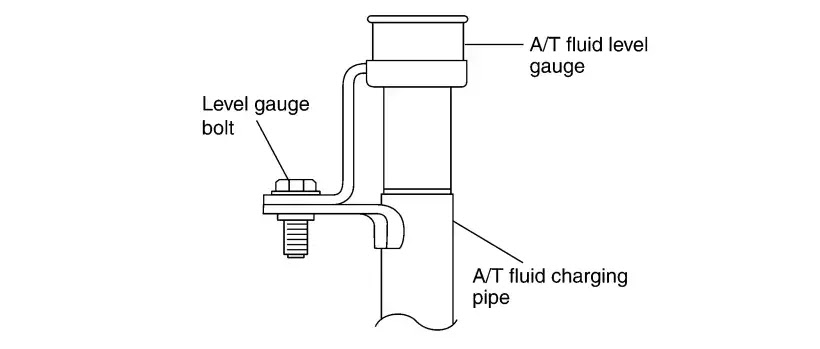
Step-3. Loosen the Level Gauge Bolt. Locate the A/T fluid level gauge bolt and use a wrench or socket set to loosen it.

Step-4. Remove the A/T Fluid Level Gauge. Gently remove the A/T fluid level gauge from its position. Take care not to damage the gauge during removal.

All About Auto Image

All About Auto Image

Step-5. Drain the Old ATF. Position a drain pan beneath the vehicle to catch the draining ATF. Remove the drain plug located at the oil pan to drain the old ATF completely.

All About Auto Image

Step-6. Replace the Drain Plug Gasket. Before reinstalling the drain plug, replace the gasket with a new one. Never reuse the old gasket as it may lead to leaks.

Step-7. Install the Drain Plug. Insert the drain plug back into the oil pan and tighten it to the specified torque using a torque wrench. Drain Plug Tightening Torque: 34 N-m (0.81 kg-m, 70 ft-Ib).

Step-8. Refill with New ATF. Refill the transmission with Genuine Nissan ATF Matic Fluid J through the A/T fluid charging pipe. Keep the engine idling during this process.

The amount of new ATF to use should be 30 to 50% increase in the specified amount. Use Genuine Nissan ATF Matic J for automatic transmission, the ATF capacity is 10.3 liter (9-1/8 imp qt).

Nissan Navara D40 Automatic Transmission Fluid Capacity

Nissan Navara D40 Automatic Transmission Fluid Type

All About Auto Image

Using a different type of ATF may cause deterioration in drivability and automatic transmission durability which might damage the A/T of your D40 Navara. This kind of problem is not covered by warranty. Therefore make sure that you follow the recommended maintenance schedule for your Nissan Navara D40.

Nissan CVT Transmission Problems: A Comprehensive Guide
Discover common Nissan CVT transmission problems in Murano, Altima, Rogue, and X-Trail. Learn symptoms, causes, and maintenance tips. Learn more » Nissan CVT Transmission Problems: A Comprehensive Guide

Step-9. Simultaneously Drain Old ATF. While refilling with new ATF, simultaneously drain the old ATF from the A/T fluid cooler hose return side. Continue this process until the color of the draining ATF matches that of the new ATF.

Step-10. Check ATF Level and Condition. After completing the refilling and draining process, run the engine at idle for 5 minutes to allow the new ATF to circulate. Check the A/T fluid level and condition. If the ATF is still dirty, repeat steps 2 to 9.

A/T Fluid Level

All About Auto Image

Step-11. Reinstall A/T Fluid Level Gauge. Once the replacement is successful, reinstall the A/T fluid level gauge back into the A/T fluid charging pipe.

Step-12. Tighten the Level Gauge Bolt. Using a torque wrench, tighten the A/T fluid level gauge bolt to the specified torque. Level Gauge Bolt Tightening Torque: 5.1 N-m (0.52 kg-m, 45 ft-Ib).

Regularly changing the D40 Automatic Transmission Fluid is a critical maintenance task to keep your Navara transmission in optimal condition. By following the step-by-step procedure outlined in this article and adhering to safety precautions, you can ensure smooth gear shifts, prolonged transmission life, and enhanced overall drivability. Remember to use Genuine Nissan ATF Matic Fluid J, as it is specifically designed for Nissan vehicles and guarantees the best performance and durability for your automatic transmission.


Nissan Navara D40 Maintenance Guide
Nissan Navara maintenance guide. Basic maintenance guide from workshop manual and mechanic previous experiences. Read more » Nissan Navara D40 Maintenance Guide

Want more videos all about auto?
Subscribe to our YouTube channel! » Cartech Home

Textual description of firstImageUrl

How to Change the Oil Filter for D40 Navara

All About Auto Image

Learn how to change the oil filter for your D40 Navara with this step-by-step guide. Keep your vehicle running smoothly and efficiently!


Textual description of firstImageUrl

NP 300 Engine Oil Change: Step-by-Step Instructions

Before starting the engine, park the vehicle horizontally level and check the engine oil level. If the engine is already started, stop and allow 10 minutes before checking.

How to inspect the oil level

1. Pull out the oil level gauge and wipe it clean.
2. Insert the oil level gauge and check that the engine oil level is within range A.
All About Auto Image

Engine Oil Appearance

• Check engine oil for white turbidity or heavy contamination.
• If the engine oil becomes turbid and white, it is highly probable that it is contaminated with engine coolant.
• Repair or replace the damaged parts.

Engine Oil Leakage

Check the engine oil leakage around the following area.

• Oil pan.
• Oil pan drain plug.
• Oil pressure switch.
• Oil filter.
• Oil cooler.
• Intake valve timing control solenoid valve and exhaust valve timing control solenoid valve.
• Valve timing control cover.
• Front cover.
• Mating surface between the cylinder block and cylinder head.
• Mating surface between the cylinder block and lower cylinder block.
• Mating surface between the cylinder head and rocker cover.
• Crankshaft oil seals (front and rear).

Guide for Removing and Installing Navara NP300 Oil Filter When removing, prepare a shop cloth to absorb any engine oil leakage or spillage. Never allow engine oil to adhere to the engine and vehicle. Read more » Guide for Removing and Installing Navara NP300 Oil Filter

Oil Pressure Check


Warning
• Be careful not to get burned, as engine oil may be hot.
• When checking engine oil pressure, the shift position should be “Parking position”, and apply the parking brake securely.
1. Check the engine oil level.
2. Remove the fender protector.
3. Disconnect the harness connector at the oil pressure switch 1, and remove the oil pressure switch using a deep socket (commercial service tool).
2: Oil cooler
All About Auto Image

Caution:
Never drop or shock the oil pressure switch.
4. Install an oil pressure gauge [ SST: ST25051001] (A) and hose [SST: ST25052000] (B).
All About Auto Image
5. Start the engine and warm it up to normal operating temperature.
6. Check the oil pressure with the engine running under no load.

Note:
When the engine oil temperature is low, engine oil pressure becomes high.

Engine oil pressure:
If the difference is extreme, check the oil passage and oil pump for oil leakage.

7. After the inspections, install the oil pressure switch as follows:
a. Remove the old liquid gasket adhering to the oil pressure switch and engine.
b. Apply liquid gasket and tighten oil pressure switch to specification.

To have an idea on how to check the engine oil level, please watch the video.

Do you want more videos all about auto?
Subscribe to our Cartechhome on Youtube

Want more videos all about auto?
Subscribe to our YouTube channel! » Cartech Home
Textual description of firstImageUrl

Starting Car Remotely, Nissan Altima Remote start

Get Your Altima Moving: How to Properly Start Your Nissan Altima Using Your Key


Watch: Starting Car Remotely (Nissan Altima)
Do you want more videos all about auto?
Subscribe to Cartech on Youtube
Are you a proud owner of a sleek and stylish Nissan Altima? If so, you know that starting your car is the first step to getting your engine purring and hitting the road. But have you ever struggled with getting your Altima started using your key? Fear not! In this article, we'll guide you through the steps to properly start your Nissan Altima using your key.
Textual description of firstImageUrl

Nissan Navara Oil Low Light Reset

All About Auto Image

Do you know what is that wrench symbol that sometimes appears on the instrument panel of your Navara D40? well, one of the special features of the Navara is the Nissan Navara oil low light. All Navara is equipped with engine oil low light and oil change schedule indicator light usually, Nissan dealer performs the Nissan Navara Oil Low Light reset. On the instrument panel of the vehicle, there is a service spanner symbol that appears on the instrument panel, the Nissan Navara oil light is flashing to remind the driver that the vehicle is due for servicing.

Nissan Navara Oil Low Light Reset

All About Auto Image

All About Auto Image

The Nissan Navara oil low light is noticeable after the ignition switch is turned on. There are a wrench symbol and a distance (to which the oil change is necessary) that will appear on the instrument panel for approximately 5 seconds. After that, the oil level information will be displayed.

Oil Good is displayed when the oil inside the engine is enough for driving.
Oil Lo is displayed when the engine oil level is low and not enough for driving.
If the oil lo appears, top up the engine with oil.

How will you know the level of engine oil?
To determine the level of the engine oil, push the reset knob while the Oil Good message is displayed, the oil level will be displayed raging level 5 to level 1.

If the distance displayed for the oil change is exceeded, a negative sign will appear just before the displayed distance and the wrench symbol will blink continuously to draw the attention of the driver, which means an oil change is necessary.

How to Reset the Service Interval on a Nissan Navara 2.5?

To perform Nissan Navara oil low light resetjust follow the procedure:

Step 1. Press the trip odometer/ reset knob for more than 3 seconds while the wrench symbol and the distance are displayed. The wrench symbol or the oil light will start flashing and the current service interval will start to show.

All About Auto Image

Step 2 Press the reset knob again to increase the interval distance of the oil change. The interval distance can be increased by 500km as the system default. The maximum interval distance shown for an oil change is 30,000 km and the minimum interval distance is 0. But if you choose the Zero interval distance, the change oil schedule function will be disabled and a wrench symbol and distance will not be shown every time the ignition is turned on.

How to activate an oil change schedule?

It is possible to adjust the interval distance to oil change by pressing the trip odometer/trip computer reset knob for more than 3 seconds while the wrench symbol and distance to oil change information are displayed. The symbol and distance display will start flashing and the display will show the current interval. Rotate the reset knob counterclockwise to decrease the interval distance or clockwise to increase the interval distance. Each step decreases/increases the interval distance by 1,000 km (500 miles).

If no further action is taken, the display returns to odometer information and the new interval is set. The maximum interval distance setting is 40,000 km (25,000 miles) and the minimum interval distance is 0. If 0 is selected, the engine oil change schedule function is disabled, in which case there will be no wrench symbol or distance shown when the ignition is turned to the ON position. To return to the oil change schedule setup mode, press the trip odometer/trip computer reset knob for approximately 3 seconds during the first 5 seconds after having turned the ignition switch to the ON position. Then proceed as described earlier.

The oil level should be checked regularly. Operating with an insufficient amount of oil can damage the engine and such damage is not covered by the warranty. NISSAN recommends checking the oil level every 5,000 km (3,000 miles).

Want more videos all about auto?
Subscribe to our YouTube channel! » Cartech Home

Textual description of firstImageUrl

Nissan Owner Maintenance Guide

All About Auto Image
On this page of all about auto, you will find the Nissan maintenance guide. Basic maintenance guide from workshop manual and mechanic previous experiences. Scroll down below to look at different troubleshooting information about the Nissan maintenance tip.

Everything You Need to Know About the Nissan Kicks

Discover the Nissan Kicks: a stylish, fuel-efficient crossover SUV with modern features and great value. Learn more in our complete guide! Learn more » Everything You Need to Know About the Nissan Kicks

The "Service Engine Soon" Light on Nissan Vehicles

Understand the 'Service Engine Soon' light on Nissan Altima, Sentra, and Frontier. Discover causes, solutions, and tips to fix it. Learn more » The "Service Engine Soon" Light on Nissan Vehicles

Nissan CVT Transmission Problems: A Comprehensive Guide

Discover common Nissan CVT transmission problems in Murano, Altima, Rogue, and X-Trail. Learn symptoms, causes, and maintenance tips. Learn more » Nissan CVT Transmission Problems: A Comprehensive Guide

How to Properly Start Your Nissan Altima Using Your Key

Learn how to start your car remotely with our guide, covering tips, tools, and steps for convenient and secure ignition. Learn more » How to Properly Start Your Nissan Altima Using Your Key

NP300 Periodic Maintenance

NP300 periodic maintenance guide: Essential tips and schedules for keeping your Nissan Navara NP300 running smoothly and efficiently. Learn more » NP300 Periodic Maintenance

Guide for Removing and Installing Navara NP300 Oil Filter

NP300 oil filter removal and installation guide: Step-by-step instructions to safely remove and install the oil filter on your Nissan Navara NP300. Learn more » Guide for Removing and Installing Navara NP300 Oil Filter

NP 300 Engine Oil Change

NP300 engine oil change guide: Detailed steps to change the oil on your Nissan Navara NP300 for peak performance and extended engine life. Learn more » NP 300 Engine Oil Change

Nissan Navara Engine Coolant Mixture Ratio

Find out the ideal engine coolant mixture for the 2008 Nissan Navara to ensure optimal performance and longevity. Learn more » Nissan Navara Engine Coolant Mixture Ratio

How to Change the Oil Filter for D40 Navara

How to change the oil filter on a D40 Navara: Step-by-step guide for a smooth and efficient process, ensuring your engine stays in top condition. Learn more » How to Change the Oil Filter for D40 Navara

How to Replace Busted Fuse for Nissan Navara D40

Learn how to replace fuses in a Nissan Navara with our step-by-step guide for a quick and easy fix to electrical issues. Learn more » How to Replace Busted Fuse for Nissan Navara D40

Nissan Navara Transfer Case Fluid Checking

Step-by-step guide to checking the transfer case fluid in your Nissan Navara. Ensure smooth operation with these maintenance tips. Learn more » Nissan Navara Transfer Case Fluid Checking

Nissan Navara D40 Automatic Transmission Oil Change

Navara automatic transmission fluid guide: Learn how to check, change, and maintain your Nissan Navara's transmission fluid for optimal performance. Learn more » Nissan Navara D40 Automatic Transmission Oil Change

Nissan Navara D40 Service Intervals

Find the essential service intervals for your Nissan Navara D40 to maintain peak performance and avoid costly repairs. Learn more » Nissan Navara D40 Service Intervals

How to Drain and Refill Brake Fluid for Nissan Navara D40

Step-by-step guide to draining and refilling brake fluid in a Nissan D40. Ensure optimal braking performance with these tips. Learn more » How to Drain and Refill Brake Fluid for Nissan Navara D40

Nissan Navara Oil Low Light Reset

Nissan Navara oil light reset: Quick and easy steps to reset the oil low light on your Navara, ensuring accurate maintenance reminders. Learn more » Nissan Navara Oil Low Light Reset


Want more videos Cartech?
Subscribe to our YouTube channel👉All About Auto
Textual description of firstImageUrl

Removing and Installing Navara NP300 Oil Filter

Removal of Oil Filter


Caution:
• Oil filter is provided with relief. Use a genuine NISSAN Oil filter or equivalent.
• Be careful not to get burned when the engine and engine oil may be hot.
• When removing, prepare a shop cloth to absorb any engine oil leakage or spillage.
• Never allow engine oil to adhere to the engine and vehicle.

1. Remove the engine undercover middle.

2. Place a pan to catch the engine oil under the lower part of the drain hose outlet before removing the oil filter.

3. Disconnect fuel filter harness connector 1.

All About Auto Image

Step 4. Remove mounting nuts A of fuel filter 1 and move it aside with its hoses connected. Temporarily secure it with a rope to avoid putting the load on its hose. Fuel filter mounting nut tightening torque: 13.5 Nm (1.4 kg-m, 10 ft-lb)

All About Auto Image
Step 5. Using an oil filter wrench, remove the oil filter.

All About Auto Image

Caution:
• When removing the oil filter, prepare waste and a tray (drip pan) to prevent the vehicle from getting soiled by oil dripping.
• Thoroughly wipe out engine oil dripped on the engine or vehicle.

Installation of Oil Filter

Step 1. Remove foreign materials adhering to the oil filter installation surface.
Step 2. Apply new engine oil to the oil seal contact surface of the new oil filter.

All About Auto Image
Step 3. Screw the oil filter manually until it touches the installation surface, then tighten it by 2/3 turn A. Or tighten it to the specification.Oil filter tightening torque: 17.6 Nm (1.8 kg-m, 13 ft-lb).

All About Auto Image

Inspection after installation

Step 1. Check the engine oil level.
Step 2. Start the engine, and check there is no leakage of engine oil.
Step 3. Stop the engine and wait 10 minutes.
Step 4. Check the engine oil level.

Textual description of firstImageUrl

NP300 Periodic Maintenance Guide

Periodic Maintenance
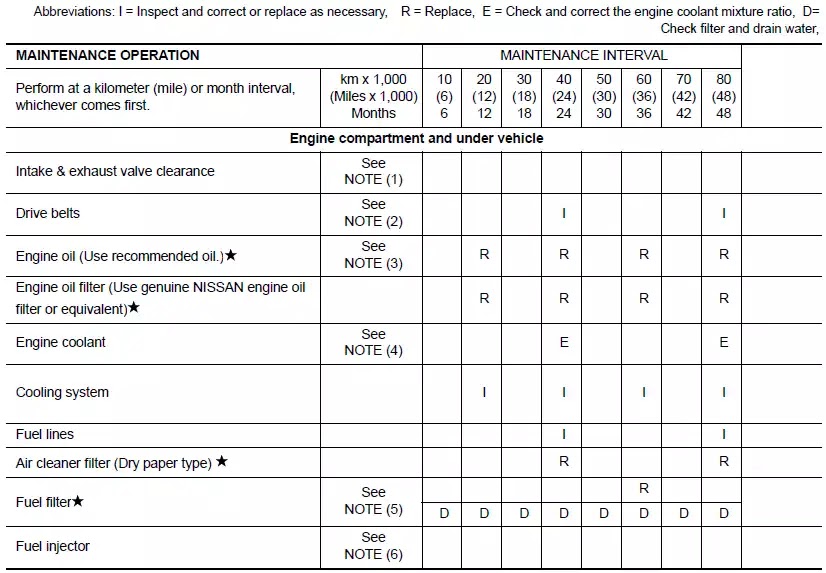
The following tables show the normal maintenance schedule for NP 300 Navara. Depending upon weather and atmospheric conditions, varying road surfaces, individual driving habits, and vehicle usage, additional or more frequent maintenance may be required. Periodic maintenance beyond the last period shown on the tables requires similar maintenance.

All About Auto Image

NOTE: • Maintenance items with “ ” should be performed more frequently according to “Maintenance Under Severe Driving Conditions”.

• (1) Periodic maintenance is not required. However, if valve noise increases, check valve clearance.
• (2) Replace the drive belts if found damaged or if the auto-tensioner reading reaches the maximum limit.
• (3) Never use JASO DH-2 or DL-1, API CG-4, or higher grade oil.
• (4) Use Genuine NISSAN Engine Coolant (blue) or equivalent in its quality, in order to avoid possible aluminum corrosion within the engine cooling system caused by the use of non-genuine engine coolant. Check and correct the engine coolant mixture ratio every 40,000 km (24,000 miles) or 24 months. First interval replacement is 160,000 km (96,000 miles) or 96 months. After first replacement, replace every 80,000 km (48,000 miles) or 48 months.
• (5) Drain water when water level sensor lamp lights on in combi meter.
• (6) If engine power decreases, black exhaust smoke is emitted or engine noise increases, perform this maintenance item.

MAINTENANCE UNDER SEVERE DRIVING CONDITIONS(YD25DDTi DIESEL ENGINE MODELS)
The maintenance intervals shown on the preceding pages are for normal operating conditions. If the vehicle is mainly operated under severe driving conditions as shown below, more frequent maintenance must be performed on the following items as shown in the table.

Severe driving conditions
A — Driving in dusty conditions
B — Driving repeatedly short distances
C — Towing a trailer or caravan
D — Extensive idling or urban driving
E — Driving in extremely adverse weather conditions or in areas where ambient temperatures are either extremely low or extremely high
F — Driving in high humidity areas or in mountainous areas
G — Driving in areas using salt or other corrosive materials
H — Driving on rough and/or muddy roads or in the desert
I — Driving with frequent use of braking or in mountainous areas
All About Auto Image

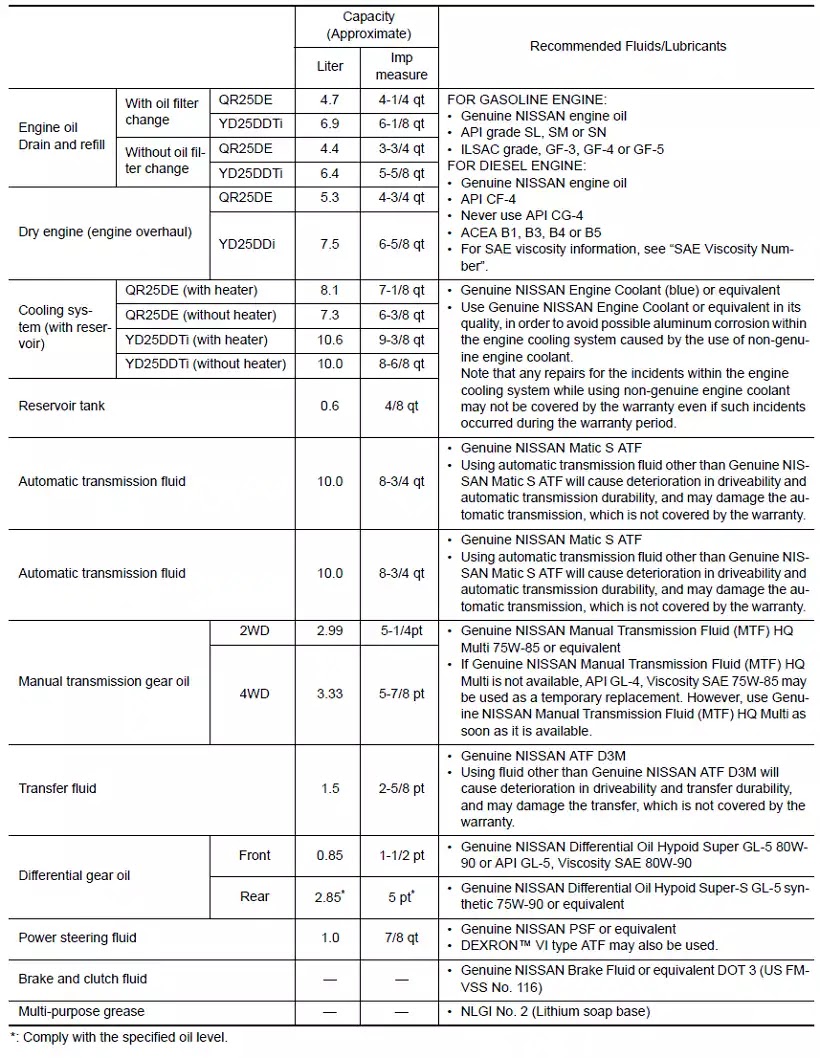
NP300 Navara Fluids and Lubricants
The following are approximate capacities. The actual refill capacities may be slightly different. When refilling, follow the procedures described elsewhere in this manual.
All About Auto Image
Textual description of firstImageUrl

Nissan Navara D40 Service Interval

All About Auto Image
Navara D40 service intervals will never be neglected because there is a feature on Nissan Navara that reminds the driver of the service schedule.

One of the crucial maintenance that must not be neglected for your Nissan Navara D40 is the service schedule. But admit it no matter how we include it in our plan we sometimes forget about it, but for Navara owner, it makes some difference, Navara D40 has features that remind the driver of the service interval. Navara service indicator light is a feature that appears on the dashboard when it is time for the change oil. It was set base on the Nissan Navara D40 service intervals.

Nissan Navara D40 Maintenance Schedule


All About Auto Image
Note:

Maintenance items with "Star Mark" should be performed more frequently according to "Maintenance Under Severe Driving Conditions".
(1) Periodic maintenance is not required, However, if valve noise increases, check valve clearance.

(2) Replace the drive belts if found damaged or if the auto belt tensioner reading reaches the maximum limit.

(3) Use Genuine NISSAN Engine Coolant or equivalent in its quality, in order to avoid possible aluminum corrosion within the engine cooling system caused by the use of non-genuine engine coolant. After first replacement, replace every 40,000 km (24,000 miles) or 24 months.

How to change the engine oil of Nissan Navara D40

Step 1. Warm up the engine, drive the Navara on level ground, and check for oil leakage from engine components. When checking for the engine oil leakage, do the inspection around each part such as oil pan, oil pan drain plug, oil pressure switch, oil filter, oil cooler, intake valve timing control cover, and intake valve timing control solenoid valve, front cover, the mating surface between the cylinder block and lower cylinder block, the Mating surface between the cylinder block and head, the mating surface between cylinder head and rocker cover and crankshaft oil seals (front and rear).


Nissan Navara Oil Light Resetting
Warm up the engine, drive on level ground, and check for oil leakage. When checking for the leakage, do the inspection around each part like the oil pan.
Read more » Nissan Navara Oil Light Reset

Step 2. After the engine is warmed up, stop the engine and wait for 10 minutes before doing the change oil.

Step 3. Loosen the oil filler cap and place a catch basin for the engine oil, then remove the drain plug to drain the engine oil.

Nissan Navara D40 Oil Filter Location


All About Auto Image

Step 4. Install the drain plug, never re-use the washer of the drain plug instead replace it with a new washer. Make sure

Nissan Navara D40 Drain Plug Location
All About Auto Image

How to Change the Oil Filter for D40 Navara
The first is to remove the engine undercover located under the engine, and then using the oil filter wrench to remove the oil filter. When removing the oil filter use a cloth to absorb engine oil leakage or spillage. Read more » How to Change the Oil Filter for D40 Navara

Step 5. Refill the engine with new engine oil. For Nissan Navara D40 with the YD25 engine & QR25 engine, the approximate refill amount of engine oil is described below. The refill capacity depends on the engine oil temperature and drains time. Use the below specifications for reference only.

Nissan Navara D40 Recommended Oil
All About Auto Image

Step 6. Warm up the engine again and check the area around the drain plug and oil filter for oil leakage.

Step 7. Stop the engine and wait for 10 minutes then check the engine oil level.


The "Service Engine Soon" Light on Nissan Vehicles
Understand the 'Service Engine Soon' light on Nissan Altima, Sentra, and Frontier. Discover causes, solutions, and tips to fix it. Read more » The "Service Engine Soon" Light on Nissan Vehicles

When doing change oil for your Nissan Navara D40, try to avoid direct contact with the used engine oil, repeated contact can cause skin problems. Change oil on your Navara D40 based on the recommended schedule can maximize the efficiency and life of the engine. Therefore always monitor the change in oil frequency.


Want more videos all about auto?
Subscribe to our YouTube channel! » Cartech Home
Textual description of firstImageUrl

Nissan Navara Transfer Case Fluid Checking

Transfer case fluid for Nissan Navara is as important as any other lube jobs that must not be neglected and included in your periodic maintenance. If you own a Nissan Navara it is necessary to periodically check the level of transfer case fluid to prevent major damage from happening.

How to check Navara transfer case fluid leakage and fluid level

1) Inspect for fluid leak all around the transfer assembly. Ensure that there is no fluid leakage all around the transfer case.

2) Remove the filler plug and check the level of the fluid from the filler plug hole as shown in the illustration. Take into consideration the engine, it must not be in running condition while the fluid level is being checked.

All About Auto Image

3) Install the filler plug. New filler plug must be used, do not use the old filler plug to ensure that no leak will happen. Tighten the filler plug.

How to change the transfer fluid for Nissan Navara

1) Make sure that the engine is stopped before changing transfer fluid.
2) Remove the drain plug and gasket then drain the transfer fluid.
All About Auto Image

3) Install the drain plug with a new gasket to the transfer case and tighten the drain plug. Remember that you cannot use the old gasket.

4) Fill the transfer with new fluid until the fluid level reaches the specified limit near the filler plug hole. Use Genuine Nissan Matic D Automatic Transmission Fluid. Fluid capacity is 2.0 liter.

5) After filling of new oil, check the oil level as shown in the above illustration. Tighten the filler plug. Never reuse the old gasket. You must replace the gasket with the new one.

Nissan Navara D40 Maintenance Guide
Nissan Navara maintenance guide. Basic maintenance guide from workshop manual and mechanic previous experiences. Read more » Nissan Navara D40 Maintenance Guide

Watch The Video


Watch more videos on auto repair Subscribe to our Cartechhome Channel on Youtube.
Help us expand the people we help by sharing this information with others. Thank you !!!
Textual description of firstImageUrl

Drain and Refill Brake Fluid for Nissan D40

After draining the brake fluid from your Nissan Navara, replace it with a new brake fluid “DOT 3” specification. Do not use the brake fluid you have drained from the vehicle. When refilling the brake fluid, avoid splashing it on your vehicle painted area it can cause damage to the paint if the fluid accidentally splashes on the painted area  immediately rinse with water.

When working with your Nissan Navara model, it is advisable to disconnect the connector of ABS actuator and electric unit or the battery negative terminal before you start any of the repair work. When doing the brake bleeding, pay attention to master cylinder fluid level.

For Left Hand Drive Navara
Step 1. First is to connect a vinyl tube to the load sensing valve. Then fully depress the brake pedal 4 to 5 times.

Step 2. With the brake pedal depressed, loosen the bleed valve to let the air out, and then tighten it immediately. Repeat steps 1 and 2 until there is no more air comes out.

Step 3. Tighten bleed valve.
Step 4. From the steps 1 to 5 above, with master cylinder reservoir tank filled at least halfway, bleed air from the rear left, front right, rear right, and front left brake, in that order.

For Right hand Drive Navara
Follow step 1 to 5 specified for the Left-Hand drive Navara except that from the steps 1 to 5 above, with master cylinder reservoir tank filled at least halfway, bleed air from the rear right, front left, rear left, front right brake, in that order.

When doing your routine maintenance always makes sure that your Nissan Navara brake fluid level is between “MAX” and “MIN” lines on the reservoir.

Nissan Navara D40 Maintenance Guide
Nissan Navara maintenance guide. Basic maintenance guide from workshop manual and mechanic previous experiences. Read more » Nissan Navara D40 Maintenance Guide


Watch more videos on auto repair Subscribe to our Cartechhome Channel on Youtube.
Help us expand the people we help by sharing this information with others. Thank you !!!